Beyond the road
Connecting Assetto Corsa & Competizione
Neither Assetto title can send telemetry over a network, so a small Windows app forwards it for you. It finds your phone itself, or asks you where it is.
Assetto Corsa and Competizione are the two titles that need something installed, and it’s worth knowing why: unlike Forza or F1, neither game can send live telemetry over a network at all. They only publish it inside Windows, on the PC running the game, where a phone can’t reach it. The Marque Telemetry Bridge is a small app that sits on that PC, reads what the game publishes, and forwards it to your phone.
Good to know
Set it up
- On your gaming PC, download the bridge from getmarque.club/download and double-click
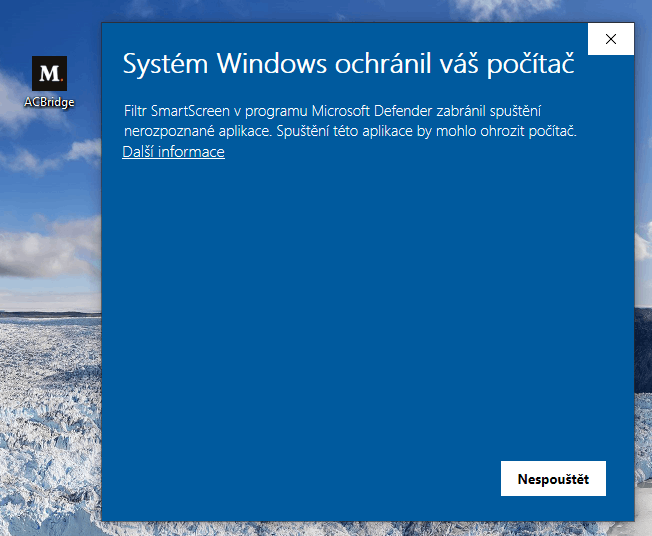
MarqueBridge.exe. There’s nothing to configure and nothing to install. - Windows will warn you the first time. A blue “Windows protected your PC” box appears because the bridge isn’t code-signed yet. Click More info, then Run anyway. The download page lists the file’s SHA-256 if you would rather check it first.
- If Windows Firewall asks, allow it on private networks. Without that it can’t reach your phone.
- In Marque, open Record › Record a virtual drive and pick Assetto Corsa or Competizione. Leave that screen open - it’s what the bridge is looking for.
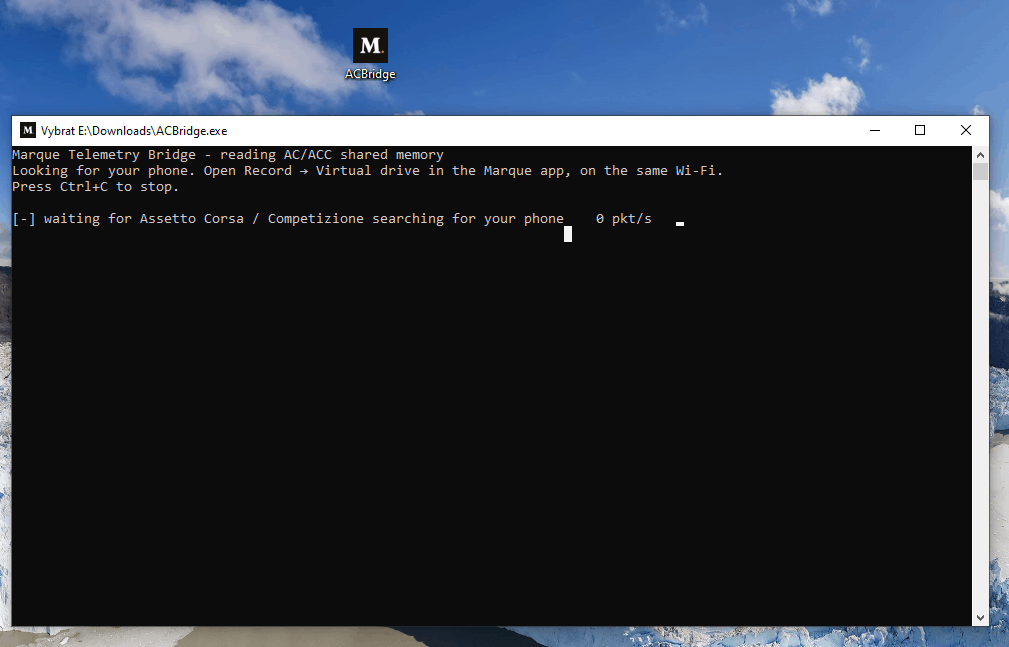
- The bridge looks for your phone itself. When that works it prints
✓ Connected to Marque, the app says Bridge found on <your PC>, and there’s nothing to do. When it doesn’t, which is common enough, especially on an iPhone, it asks for an address after about five seconds. Read the one on the app’s Connect card, type it, press Enter. That path works just as well, and it only asks once. - Tap Start, launch the game, and drive.
Screenshot to come
The app showing "Bridge found on <PC>"
If two phones answer
The bridge asks the network “is there a Marque app out there?”, so in a household with two of them it can get two answers. It won’t guess. Instead it stops and asks for a pair code - the four digits shown on the Virtual drive screen of the phone you actually want.
Type those four digits once and it remembers them; from then on nobody else’s phone even replies to it.
Screenshot to come
The pair code on the app’s Virtual drive screen
When the bridge asks for an address
This is normal, not a fault, and particularly common on an iPhone. The bridge finds your phone by putting one question on the network, and plenty of networks won’t carry it: guest Wi-Fi with client isolation, a “Public” firewall profile, phone and PC on different VLANs. iOS is stricter still and doesn’t receive that kind of message at all, so an iPhone is usually typed in once.
Read the address off the app’s Connect card, type it at the prompt and press Enter. The bridge saves it and tries it first every night after that. MarqueBridge.exe --host <phone-address> does the same thing from the command line, without the wait.
Good to know
If it doesn’t connect even with the address typed in, work down this list.
- The Virtual drive screen must be open in the app. The phone only answers while you’re on it. The bridge notices you left within about fifteen seconds and goes back to looking.
- Set the PC’s network to Private in Windows network settings, and allow the bridge through the firewall.
- Turn off VPNs on either end.
- Check both are on the same Wi-Fi - not one on a guest network and one on the main one, and not one on 5 GHz of a router that keeps its bands apart.
Check the link without the game
Running MarqueBridge.exe --demo --host <phone-address> streams made-up telemetry, so the cockpit in the app moves even with no game open. If that works, the network is fine and the problem is on the game side.
Worth knowing
- Keep the bridge up to date. Bridge 1.6.0 and later send the sim’s own g-forces, turbo boost, the track layout and a map for Competizione laps too. An older bridge still works, with less detail.
- Leave it running all evening. Assetto Corsa starts a fresh session each time you take out a different car; the bridge lets go of the old one and picks up the new one within a second or two.
- It remembers your phone between runs and tries there first, so the second night never asks anything.
- The pair code isn’t a password. It settles which phone, nothing more - anything on your network could already read the telemetry going past.
- Stuck on “waiting” while you’re actually driving? That’s a bug worth reporting. Run
MarqueBridge.exe --scanand send us what it prints.
Tip
Still stuck?
If something here doesn’t match what you see, or you’ve hit a wall, we’d rather hear about it. Email [email protected] and we’ll get back to you.
Browse all help topics